

If you use a WordPress site, you will know how important plugins are. But apart from the solutions they offer, sometimes they can also be the reason for the entire site to go down.
Let's say you updated one of your plugins and your blog no longer works.
As a good administrator, you know that you should not do anything if you have not kept a backup of your page, but this time, unfortunately you did not keep a backup copy. It happens even to the best of families…
If you've ever been in a scenario like the one above and found yourself cursing the time and moment of the update, read below:
Wouldn't it be nice if you could download previous versions of plugins available through wordpress.org? You could very easily fix your WordPress blog by uploading the previous version that didn't have any problems.
From your browser, go to the plugin you are interested in, using the address wordpress.org/plugins/<plugin-name>
or just open the page
https://wordpress.org/plugins/
and search for the plugin you are interested in from the search box.
If you now go to the tab (on the right) called “developers” or Developers, and scroll down a bit, you will see that there are all the older versions of the plugin you are interested in.

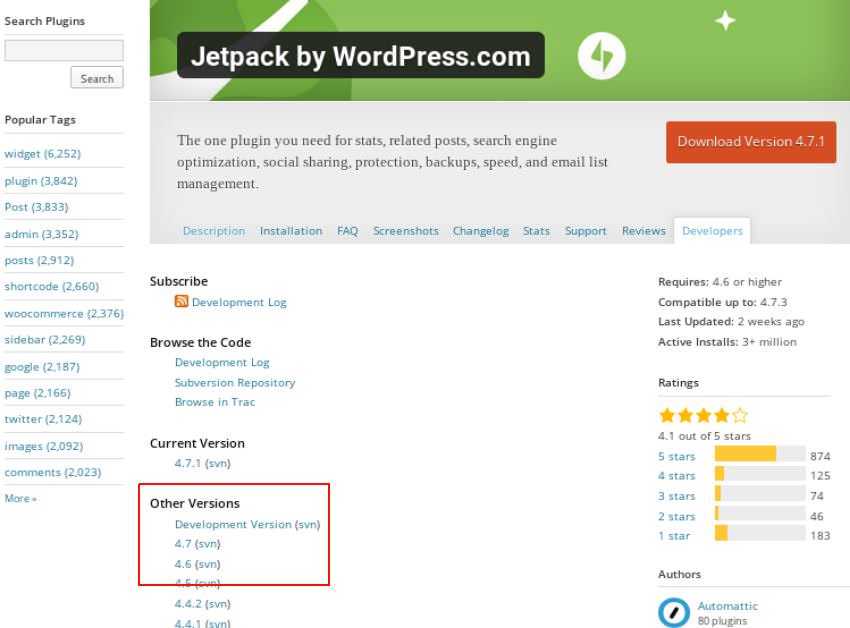
Of course, you can download any version of the plugin that has been released via wordpress.org. Simply click on the version number to download the plugin as a ZIP file.
Use an FTP connection to upload it to your site (after deleting the files that caused you the trouble) and everything will work fine again.
