

Security Plus: Sometimes it's hard to tell if a link to a website or domain is secure or not. While the site's URL can sometimes give you clues, you can never be sure even if you've visited the same link thousands of times.
What you can do in this case is to check the site against malware databases. There are many services available online that can do this, such as Web of Trust.
Many of these services have one thing in common: they provide you with one result. However, if you prefer more results, as they improve the chances of a correct assessment, then you can use services like Virustotal.
Simply visit the service, and paste the url, into the box. Wait until the results appear on your screen. While this service is quite useful, the process takes a lot of time especially if you check connections regularly.
This is where a Firefox add-on comes in. Security Plus is a Firefox browser extension that adds a new entry to the right-click menu. The entry allows you to check a link directly on the Virustotal service.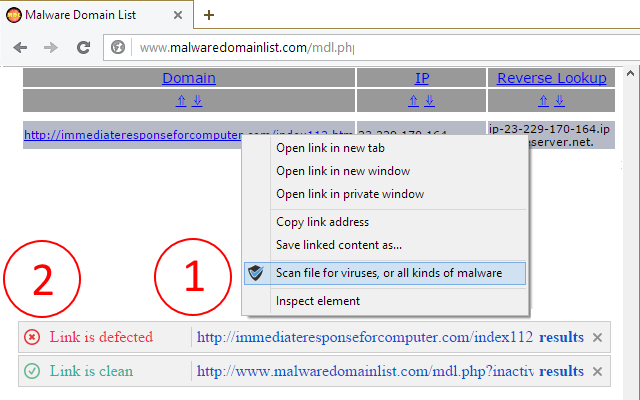
This, of course, is done without having to leave the site since the results appear on the same page with a small overlay on your screen.
The results show whether the website you are connected to is clean or not with all 64 services supported by Virustotal. The extension will scan all selected connections.
The main advantage with the Virustotal page is that the results are displayed on the same page and not on a new page that opens when you start the scan.
If you're using Chrome, you can check out VTChromizer. Internet Explorer users can try Internet Explorer VTExplorer. Both of these extensions open the scan results in a new page.
