

 The software company Ashampoo is one of the companies we collaborate with, providing free giveaways to iGuRu.gr users with reliable software solutions. After communication they had with us, they suggested that we test and present the new version of Ashampoo Slideshow Studio (HD 3) before it even hits the market. The new software will be officially presented by the company on February 17, 2014.
What does Ashampoo Slideshow Studio HD 3 do?
Present your favorite photos with slideshows. Choose from various templates related to the occasion or your own designs, add background music and sound effects, record your own voice narration, add texts, render everything into HD video and burn to disc.
Description:
Your photos have a story – tell it with Ashampoo Slideshow Studio HD 3. Choose from various templates related to each occasion you want to present or create your own design to build aesthetic slideshows with background music and sound effects, record your voice and add text narration and illustrations. When you're done, you can convert it into a Full HD video that you can upload to social networks or simply burn to DVD and Blu-ray.
– Intuitive, well-structured UI.
– Different preset timelines and subtitle styles
– Various themes and logos depending on the case you want to use them
– Fully animated opening and closing
– Transitions Blocks, Bubble, Butterfly, Circular, Clock, Diamond, Fade, Fall, Melting, Sand, Slide Over, Squares, Star, Sweep, Swirl, Flip, Wheel, White Out, Curtains
– Customizable Ken Burns effects (auto-panning and zooming)
– Objects: Add, edit, rotate, mirror text, tables, image and shape overlay
– Automatic embedding of file data (file name, size, date) as text objects
– Adjustable fade/display duration for slides and embedded objects
– Apply background music
– Various individual sound effects
– Record from any Windows built-in recording device, e.g. microphone
– Create (full HD) videos and burn to DVD and Blu-ray discs
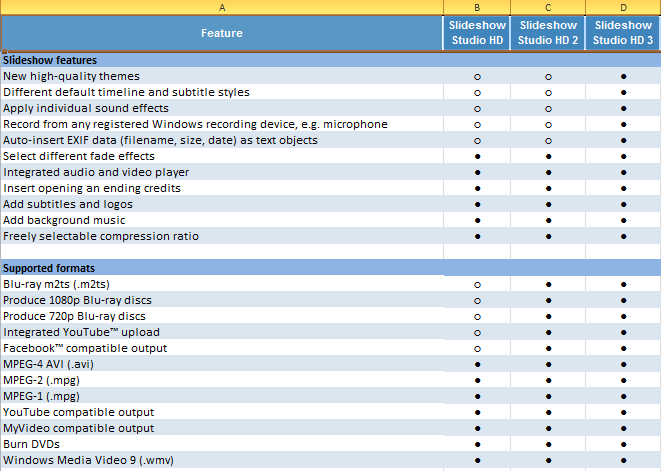
Differences from previous versions
What we observed
The installation was no problem, it was quite easy, even for the most novice user. Besides, Ashampoo is known for its reliable applications that are easy for anyone to manage.
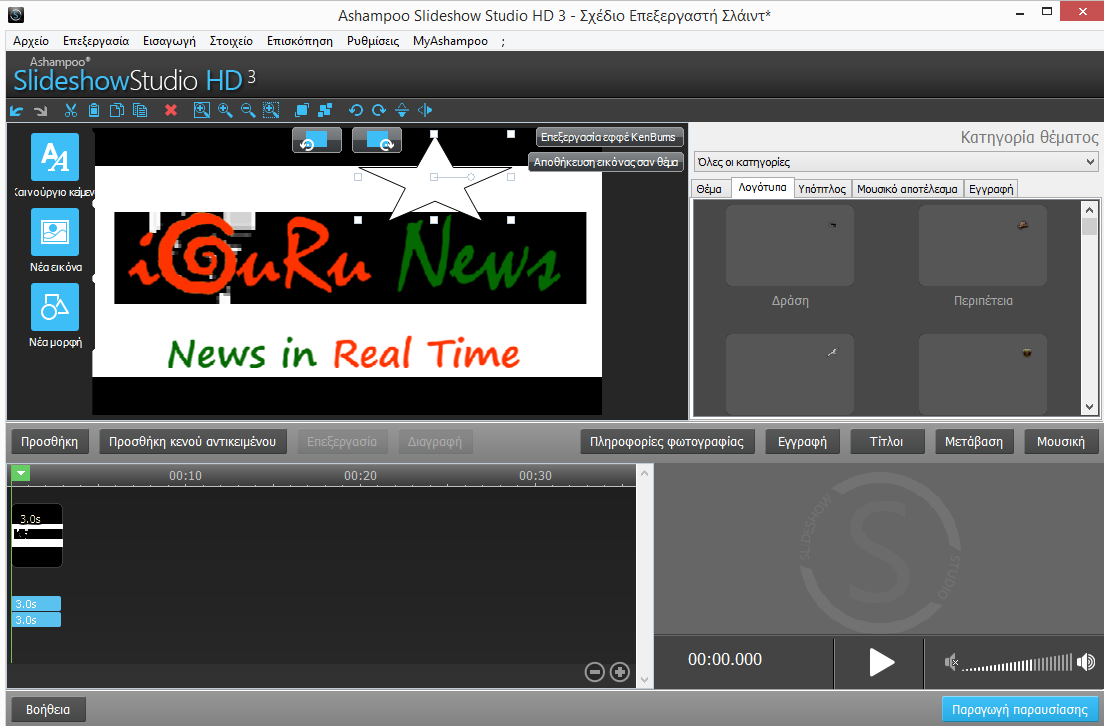
The program's interface is quite intuitive, with many different functions in tabs easy to use. The tabs start with selecting the images you want to include in the presentation, in the next tab you can choose a theme that fits your case (holiday, latest news, etc.) and you want to frame it with images, in the third you can edit captions and texts, in the fourth, you have a preview of the presentation. All easy in steps and quite simplified. Additionally, you can easily select the effects that will be used when the images change, add music and more. An integrated Help file, quite well-written, explains the application's functionality.
We recommend the program unconditionally to everyone, especially those who are not into graphics. It's a solution to get them out of a jam.
The application has minimal system resource consumption.
Positively
Very easy to use. Slides with images, music, recording to DVD and BLUE-RAY, with minimal movements.
Negatives
We will wait to see its price, although we don't expect surprises from Ashampoo.
Summary
We recommend the program unconditionally to everyone, especially those who are not involved in graphics. Easy, simple and very useful. It's amazing how many functions a 30MB application can include.

[taq_review]
