
Google is testing a new feature in Chrome Canary that warns users when they open large pages. Chrome displays a notification to users, and gives them the option to stop the loading.
Not all websites are the same in size and speed. You may have noticed that iGuRu loads very quickly compared to a common website, for example Wikipedia. This is because some websites are heavier than others, and if you look a little deeper you will notice that the differences lie in the size, script execution, resource usage or cookies set on the user's system.
While Internet users with fast broadband connections may not care if a page exceeds a certain size limit, say 1 Megabyte, users on slow connections may not feel very good about having to wait for every click they make.
While it’s obvious within the first 3 seconds whether a webpage you’re trying to view is heavy or not, Google is testing a new warning feature in Chrome Canary that lets you know whether a page will be a pain or not.
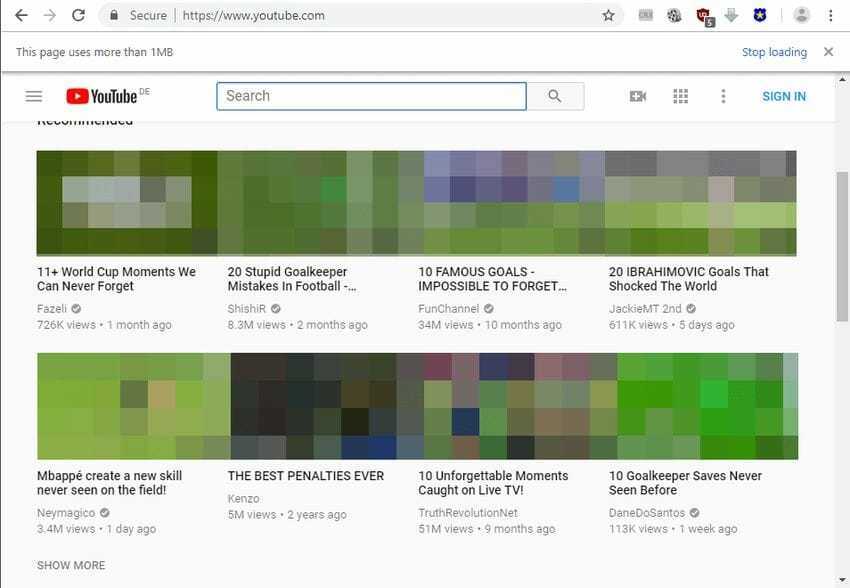
Interestingly, many Google-owned websites, such as YouTube, are considered heavy by Chrome, as opening them will prompt Chrome with a “this page uses more than” warning.
The feature is only available in Chrome Canary as of today. Since it’s an experimental feature (or warning, if you prefer), it’s possible that it could be removed and not added to a Beta or stable version of the Chrome browser.
For now, though, you’ll need to have Chrome Canary installed to enable it. If you have already done so, here's what you need to do next:
1. If you are not sure about the version, go to chrome://settings/help and make sure you are running Chrome Canary 69.0.3493.0 or later.
2. Then go to chrome://flags/#enable-heavy-page-capping and set the flag to Enabled or Enabled (Low). The difference between the two is that Enabled (Low) has a limit of 1 Megabyte while Enabled has a higher limit (which is not mentioned).
3. Restart your Chrome browser.
For any page that is larger than the lower limit, 1 Megabyte, if you have the low option selected, you will get a notification at the top informing you of this as well as an option to stop loading the page immediately.
Or you can simply press the Esc key on your keyboard to stop the loading or the stop button if the loading is taking too long. It would be more useful, in our opinion, if Google displayed a loading progress bar to indicate the loading speed.
Google is testing a warning feature for heavy pages in Chrome

📧
Subscribe to the SecNews Newsletter
