

Last night, Apple released the “biggest iOS update ever” – iOS 10 and macOS Sierra. However, less than an hour after the launch, social media was flooded with complaints from users that their iPhones and iPads were “hanging out” after attempting to update to iOS 10.
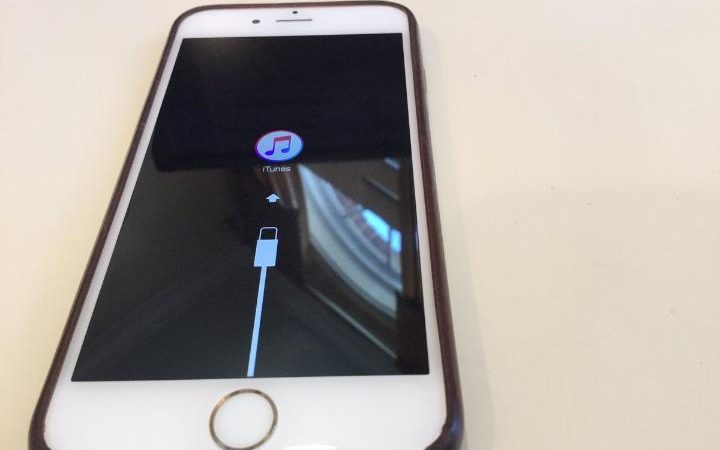
It has been reported that smartphones or iPads would shut down to install the software after downloading the iOS 10 update. Instead of the device automatically returning with iOS 10 installed, a notification would appear telling users to connect their phones to a computer, rendering the smartphone unusable until they did so.
However, Apple has issued an official statement saying that it has already resolved the issue. The company claims that it only affected a “small number of users” in the first hour the update was available.
“We experienced a brief issue with the software update process, affecting a small number of users during the first hour of availability. The issue was quickly resolved and we apologize to those customers. Anyone affected should connect to iTunes to complete the update or contact AppleCare for assistance.”
Apple Support has reminded users to back up their smartphones before attempting to upgrade and suggests downloading the software via iTunes.
If you're one of the many unlucky users who finds your smartphone or iPad not working after the upgrade, all you need to do is connect the device to a Mac or PC, open iTunes, and perform a restore. Here's what you need to do.
- Connect your iPhone or iPad to your Mac or PC.
- Open iTunes on your Mac or PC.
- Press and hold your device's Sleep button and Home button simultaneously until you see the recovery mode screen.
- An option in iTunes will ask you to update or restore. Select Update.
- When the installation is complete, you can use your smartphone.
Note: Repeat steps 2-4 if you have a problem during installation.
