

Ashampoo Backup Pro 12: Are you looking for an easy-to-use yet powerful backup solution? Ashampoo® Backup Pro 12 protects you against viruses, ransomware and Windows errors! 
The new Ashampoo Backup Pro 12 offers you various options to back up individual files or entire disk partitions to any storage medium or to the cloud.
Everything happens in the background and the program is light on system resources. Even in the event of a complete system failure, the comprehensive emergency solution can restore your system!

Success in just a few clicks
A backup solution for beginners – with professional results!
Ashampoo Backup Pro 12 requires no prior knowledge. Advanced backups can be created in just a few steps! Various assistants are available for all program settings and the various presets cover all common use cases such as backups to emails, browsers or contacts.
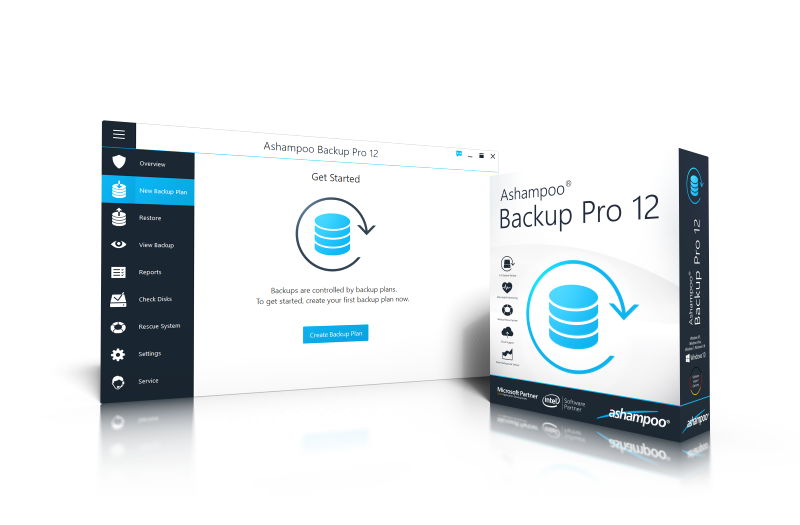
A backup solution for everyone!
 | Powerful disk checking for 100% reliable backups |
| Backup and restore entire Windows systems |
| Backup Viewer: Direct access to backup files |
| Support for OneDrive Business/Office, Owncloud and Nextcloud |
| Your lookalike against ransomware |
| New and easy-to-understand user interface |
| Well-structured and clear design |
| Easy-to-use rescue system with UEFI support |
| New system restore tool |
Now with disk health inspection
Identify and fix disk errors
Disk failure can ruin your backups! That's why Backup Pro 12 supports disk health checks including SMART data! This allows the program to warn you of impending drive failure and gives you time to act before the worst happens! Additional detailed scans of drives and partitions detect corrupt data blocks and move infected files to preserve your data. Internal or external – the new hard drive diagnostics feature ensures that your data remains safe at all times!
Instant access to files with Backup Viewer
Easily view and open files from backup
For backups to be useful, they need to be easily accessible and useful. That's why Ashampoo Backup Pro 12 provides a special viewer, allowing you to access your files without having to restore them first. Access to files occurs in a secure archive to prevent unwanted modifications and keep your backups safe!
New user overview and handling
Clean, logical, beautiful: the new face of Ashampoo® Backup Pro
Ashampoo® Backup Pro features a completely redesigned user interface to make your work easier as you navigate through the steps with the help of wizards. A backup solution to sit back, relax and work smart! No prior technical knowledge required.

Automatically safe
Once enabled, your backups will always be up to date
Ashampoo® Backup Pro can create backups fully automatically in the background. Once activated, you don't need to do anything! And backup processes automatically pause to avoid delays when you need the full power of your computer!

Easy cloud backups
Storing backups online
Flexibility is everything in the new Ashampoo® Backup Pro 12. That's why there is no longer a limit to the number of supported cloud service providers! Another welcome addition is the support for OneDrive Business / Office 365, Owncloud and Nextcloud. Now, you can work independently of local storage devices! This does not only apply to regular files, but also includes entire backups of drives! Dropbox, Deutsche Telekom, Google Drive, OneDrive, Strato, 1&1 and many more are fully supported.

Ashampoo Backup Pro 12 Flexible data recovery
Individual files, entire partitions, or system restore
The choice is yours: extract individual files from backups using virtual disks or restore entire drives! If all else fails, the built-in rescue disk or flash drive will help you restore your computer. That's all you need to get Windows working again!

Ashampoo Backup Pro 12 The cure for ransomware and viruses
No need to reinstall – the solution against malware
Ransomware takes your computer hostage and encrypts your personal data. Viruses destroy entire systems and take control of your computer. Ashampoo® Backup Pro can prevent these difficult situations with ease! Simply restore your system to a previous state and you're done!

Ashampoo Backup Pro 12 No more fear of updates
There will be errors – but not on your computer!
System updates are important but often flawed. In the worst case scenario, a Windows update has so many bugs that it locks up your computer or causes data loss. It’s one of those moments when you say “Yesterday, everything was working fine!” – and that’s exactly how Ashampoo® Backup Pro 12 will restore your files! No more worrying about security software or Windows updates, you’re safe now!
Ashampoo Backup Pro 12 Manually triggered backups? No more!
Smart backup mechanism for uninterrupted work
Many competing products require you to manually activate the backup process, and when activated, the process will often cause a noticeable slowdown in the system. Not so with Ashampoo® Backup Pro 12! You will not notice anything when the program performs scheduled backups. It is a continuous process that takes place in the background without disturbing your work! Ashampoo® Backup Pro 12 constantly analyzes your processor load and is activated only when there are enough processing resources. It is like an invisible assistant that performs tasks in the background!
Try the application
[su_note note_color=”#ebebeb” text_color=”#271e45″ radius=”2″]The first six (6) to comment on this post (not on social media) will receive a license to use the email they provide to make their comment.
The licenses will be sent once the 6 comments are completed. [/su_note]
___________________________________
- Debian 9.5: Fifth point release of Stretch available
- Windows Defender hidden command to block adware
- Google Chrome do you know all the internal hidden features?
- Keyloggers: Some protection methods for everyone
- Shrug ransomware: unlock your computer without ransom
