

The stable version of Bitdefender Adware Removal Tool has just been released to the market. Users can easily download the trial version and test its capabilities. The tool targets PUPs (potentially unwanted programs), hijackers (such as applications that change the browser's homepage), browser toolbars and add-ons.
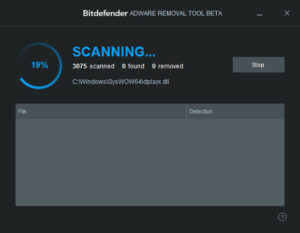
This type of threat is usually embedded in “ad-supported” installers and gets installed on the computer with or without the user’s permission. Some of their creators embed the malware into installers of popular programs (usually pirated) to trick users in order to generate revenue. Those familiar with Bitdefender know the good reviews and reliability of its products, so it is not surprising that the Adware Removal program is equally effective and easy to use. In fact, it is much easier to handle, because it does not contain more features than necessary: scanning for adware, selecting which applications to keep, and removing unwanted files.
No installation required
Bitdefender Adware Removal Tool does not require installation. It consists of an executable file that allows users to launch Bitdefender from any location on the hard drive. Unlike most antivirus programs, it does not create additional files on the disk and does not modify Windows registry settings – so it leaves no trace behind when you remove it. The main advantage of portable tools is that they can be kept on a USB drive, so Bitdefender Adware Removal Tool can quickly run on any machine and rid us of adware files.
How it works
The operation is carried out from a single window with an easy-to-use design. Bitdefender does its job with minimal user intervention. It scans all critical parts of the operating system for adware (such as the Windows directory and “Program Files”), revealing the total number of objects scanned, how many malicious files were found and how many were removed, along with the full path to the currently scanned file.
Advantages
Bitdefender Adware Removal Tool works on all popular versions of Windows, from XP to 8 / 8.1. It includes help, documentation and is extremely easy to use. Scans are automatically performed on the important parts of the computer where adware is usually hidden. Users can review the results list with all identified adware files and select the ones they want to remove, while keeping the rest. It is extremely easy to use, portable and free.
Cons
Since this is a very simplistic application, Bitdefender does not have an option for custom scanning, such as selecting targets to examine in cases where users suspect specific drives or directories to contain adware.
The Truth
Bitdefender Adware Removal Tool is a simple and effective way to get rid of adware. However, it is in no way a substitute for anti-malware software.
