

iPhone owners are known to love their phones, but they're also known to suffer from their mediocre battery life—even if they don't admit it publicly. iPhone users who really use their phones intensively can barely make it through a full day.
However, with the following settings, which apply to iOS 7 and later and iPhone 5 and newer phones, we believe they will succeed! (some of the settings can also be made on older devices)
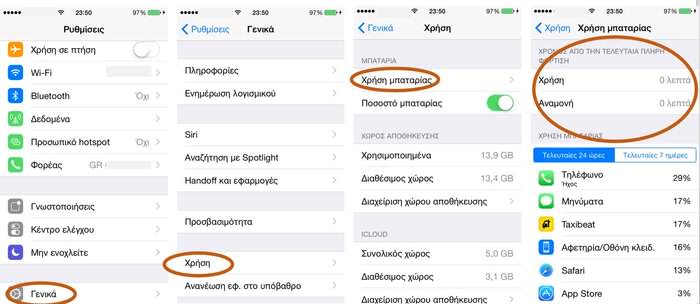
First, check your battery by going to "settings", "general" and finally "usage"
What you need to modify
If after the above check you discover that you belong to category "5" you can make the following changes:
- Turn off location services for Facebook, which is the most power-hungry app. If you don't mind, turn off all location services or carefully choose the apps that need them, such as a satellite navigation app. iOS 8 gives you more options for location services, such as "never", "always", "while using the app", so you can customize it completely according to your needs.
- Disable background app refresh for as many apps as you can. Again, Facebook is the heaviest app here, but you can do a trick to see what you really need. Close them all and start enabling one app at a time depending on your usage.
- Don't constantly close apps from multitasking. By double-clicking the home button, you see which apps are running in the background of your iPhone and you tend to close them because you think they are consuming battery. Wrong. What you see is a "frozen" image of the app in the phone's memory and nothing more, but while it doesn't consume power, it has a use. If you constantly close apps from the background, when you need them again they will have to be completely restarted in RAM, consuming more battery...
- Turn off the automatic update of the phone's time. This setting is a drain on the battery. It's just that if you travel and change countries, you will have to set the time again.
- Turn off AirDrop. If you're not using it, there's no reason for it to be running.
- Turn off AutoUpdate for applications.
- Choose to reduce motion. Wallpapers that move slightly when you move your phone are impressive, but they draw extra power.
- Turn off the battery percentage display. It eats up extra power and makes you stressed for no reason.
- Enable and adjust auto-brightness properly. The screen is the most power-consuming part of the phone. Adjust the auto-brightness function properly in the following way:
- In "settings" select "Display & Wallpaper"
- Go to a dark room and turn the brightness to minimum.
- Turn off automatic brightness and then turn it on. This way your phone will adjust itself properly.
Source: thetoc.gr
📧
Subscribe to the SecNews Newsletter
