

Delete the Windows.old folder that's 'clogging' your disk - It's a huge folder that appears after upgrading to Windows 10, and you can remove it, but it requires great care.
After installing Windows 10, Roy A. Day discovered a very large Windows.old on his internal drive. Since deleting it the conventional way didn't work, he looked for another solution.

The Windows 10 upgrade (which many have seen with enthusiasm despite what is said and written) leaves a huge Windows.old folder on your C: drive. And Windows won't let you just delete it.
There's a very good reason why you shouldn't just let them do it. Without this folder, you won't be able to go back to Windows 7 or 8.1. Therefore, you should only delete the Windows.old folder if one of these three situations applies to you:
- Are you absolutely sure you want to stay on Windows 10?.
- You created a backup before the upgrade, and you can therefore restore the previous installation without Windows 10's built-in tools.
- It's been more than 30 days since you upgraded, and Windows 10 no longer lets you go back.
If you answered yes to even one of the above situations, below you will see how you can free up a lot of space on your C: drive:
1. In File Explorer, right-click C: (under This PC) and select Properties.
2. On the General tab, click the Disk Cleanup button.
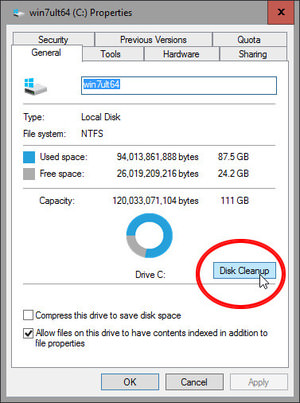
3. Wait for Windows to process it. Eventually a 'Disk Cleanup' dialog box will appear.
4. Click the Clean up system files button near the bottom of the dialog box.
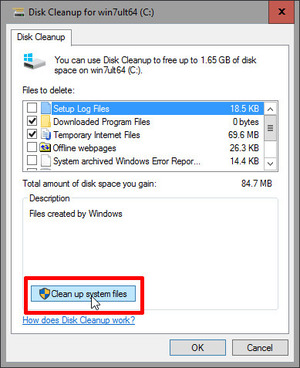
5. Wait a little longer. The dialog box will disappear, and reappear in a slightly modified version, without the button you just clicked.
6. Scroll down the 'Files to delete' list until you find Previous Windows installation(s). Check this option.

7. Select or deselect the other options. You will have to make your own choices.
8. Press OK. You will be asked twice to confirm your decision. Answer affirmatively.
You will have to wait a while for Windows to remove all the files. When the process is complete, the free space you will have on your disk will be much larger.
