

Apple added a new accessibility feature, Voice Shortcuts, to iOS 18. Now that iOS 18 is available in beta , users have discovered that this feature allows Siri to learn new words.
Read more: Apple: Some Siri features won't be released in iOS 18 until 2025
With Vocal Shortcuts, you can assign a custom phrase that Siri can understand to launch shortcuts and perform “complex tasks.” One of the shortcuts you can set up is an alternative to “Hey Siri.”.
To set up a voice shortcut for Siri, open the Settings app, go to Accessibility, and scroll down to Voice Shortcuts. From there, select “Set Up Voice Shortcuts,” then select “Siri” (not “Ask Siri”). Type the new phrase you want to use to activate Siri, such as “Computer.”.
Once your new phrase is set, you can say it to activate Siri on your iPhone. Note that this feature is limited to the iPhone and doesn't sync with other devices, like the HomePod, so you'll need to use "Siri" for those devices.
Also read: Apple: It appears not to be paying OpenAI to use ChatGPT in iOS 18
As reported on Reddit, when you set up Voice Shortcut, you have to pause to wait for it to activate before giving your command. With Siri, you can say the entire phrase, like “Hey Siri, what time is it?” without having to pause. This feature isn’t available with the Vocal Shortcut setting. You have to first say your wake word, pause, and then give your command once Siri activates.
Because of this delay, this probably isn't an option most people will want to use all the time. However, Siri will still be activated with "Hey Siri" as well as the shortcut.
See also: iOS 18: You can choose Apple TV or HomePod as your Home Hub
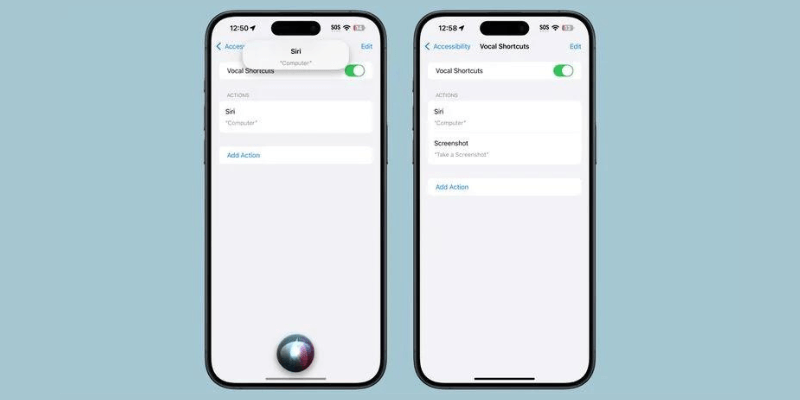
Voice shortcuts can be used to set a voice command that will perform any shortcut, as well as to activate apps, functions such as taking a screenshot, changing volume, scrolling, activating Control Center, and more. These shortcuts can be combined with a custom sound in place of speech and are a useful accessibility option for those who need alternative ways to activate system functions.
Also read: iOS 18: Adds Pop-Out Bezel animations when you press iPhone buttons
Source: macrumors
