

Apple Maps has undoubtedly gotten better over the years. However, there's no denying that Google Maps remains the best mapping app available today. This, of course, shouldn't come as too much of a surprise considering that Google Maps was released in February 2005, seven years before the Apple Maps app debuted. Over the past 16-plus years, Google has managed to incorporate a number of impressive features into its mapping software. One example of a Google Maps feature you might not know about is that it helps you avoid getting a speeding ticket.
See also: Google Maps bug in Android Auto causes navigation to stop working

Google Maps speed trap feature
Few things in life are more frustrating than getting a speeding ticket. Of course, you can now avoid speeding tickets entirely by simply following the speed limit. However, the reality is that everyone tends to speed occasionally, especially when there's no traffic.
If you fall into this category, you may be completely unaware that Google Maps has a feature that notifies you when there's a speed trap on your route. A speed trap, as a quick primer, is an area next to a highway where police sit and watch how fast cars are going.
See also: Google Maps is testing a new bottom bar for easier searching
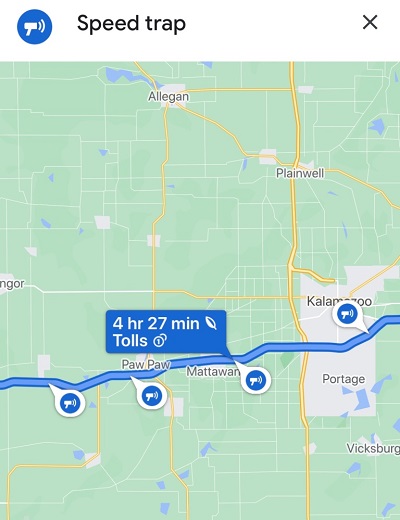
Google Maps, however, has a feature that notifies users where some of these speed traps are located. To check the feature, simply open Google Maps and enter your destination. If there are marked speed traps along your route, you'll see a blue loudspeaker icon.
For example, a driving route was searched from New York to Wisconsin. Along the way, Google Maps alerted to a few speed trap locations set up along a stretch of highway in Michigan, as shown below.
Additionally, once you start a trip, you can set an option for Google Maps to send you an audio alert when a speed trap appears. To do this, simply start navigation, tap on any notification icon on the screen, and the speaker icon will appear where you can either turn off or unmute these alerts.
See also: Avoid crowds at your holiday shopping with new Google Maps features
In short, this feature has been available on Android for quite some time. It also arrived on the iPhone in 2019.
Information source: bgr.com
