

Every time you upgrade an iOS device to a new version of the operating system, there is a small window where you can go in and restore the old version (in case you find a bug or two)

But you're really limited in time with this option. Apple devices only install software that's "signed" by Apple, and when a new iOS version is released, older versions are marked as invalid within a few days (or weeks if you're lucky). The process you need to go through to get back to an older version while it's still considered valid by the company is to go through a process called "downgrade".
https://www.secnews.gr/102558/zero-day-mac-os-x-apple/btn-large” variation=”btn-success”]OS X | Zero-day bypasses Apple's new protection feature
Before downgrading, make sure you have a backup of your device's files, photos, music, games, and anything else you want to keep. Downgrading and restoring completely wipes your iPhone or iPad and forces you to start over. As for official iOS backups (in iTunes and iCloud), you'll need to go back to the last saved state of the iOS version you're downgrading to, so if you've saved photos or other files since then, you'll need to handle them separately.
iOS Downgrade
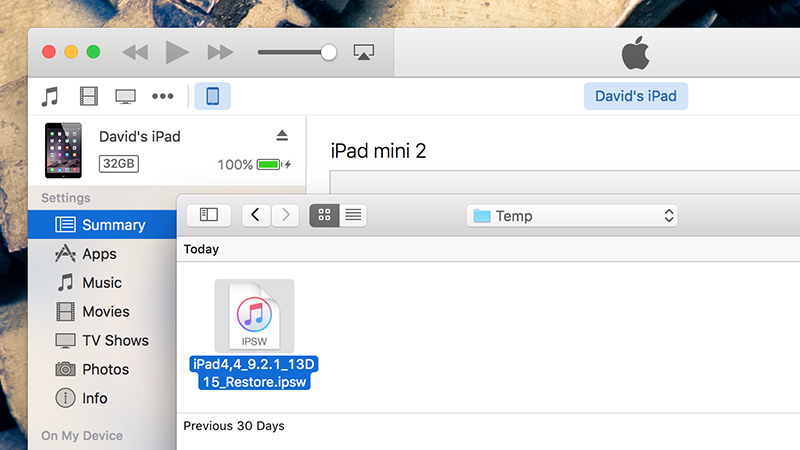
To downgrade, you need the older IPSW file (iPhone or iPad software). This may be on your computer if you upgraded via iTunes and your desktop operating system hasn't cleaned it up. On OS X, go to ~/Library/iTunes and on Windows 10, go to Users\<User> \AppData\Roaming\Apple Computer\iTunes folder. You're looking for a folder called iPhone Software Updates or iPad Software Updates.
If you can't find the older IPSW (.ipsw) file on your local system, there are several online repositories where you can download archived files for free, such as IPSW Downloads. Select your device, select the iOS version you want to roll back to, and download the file. IPSW Downloads marks in green the packages that are currently considered valid by Apple.
https://www.secnews.gr/102456/apple-released-imessage-patch/Apple fixes serious encryption flaws in iMessage
Open iTunes and connect your device. Open the device page within iTunes and you'll see the familiar Restore screen. Instead of clicking the Restore button like you normally would, press Option+Click (OS X) or Shift+Click (Windows) which will prompt you to select an IPSW file instead of using the latest one from Apple. Select the file you downloaded earlier and the reset will begin.
Downgrading from a beta version
Downgrading from a beta to an older, stable version is a simple process, but keep in mind that backups saved while the beta was running will no longer work. Before connecting your device to your computer, shut it down, then press and hold the Home button until you see the message “Connect to iTunes” on the screen.
You should see a notification on your screen saying there's a problem with your device, and then you can tap Restore to begin the process. This time, you don't need to select an IPSW file as iTunes simply uses the latest, stable version of iOS straight from Apple. After a few minutes, you'll have a factory-fresh device ready to start again.
It's an easy process if you learn how to do it, but the restrictions imposed by Apple mean you have a certain time limit to do it, so we advise you to act quickly as it is usually only possible for a short time after a new version is released.
https://www.secnews.gr/102628/to-fbi-ksekleidwse-to-iphone-tou-san-bernardino-xwris-tin-voitheia-tis-apple/The FBI unlocked San Bernardino's iPhone without Apple!
